Everything outbound needs, in one workspace.
Find the right people, reach them on email and LinkedIn in one sequence, and see who is interested first. Do it yourself, let our AI sales assistant build and send the next campaign, or let our team run it.
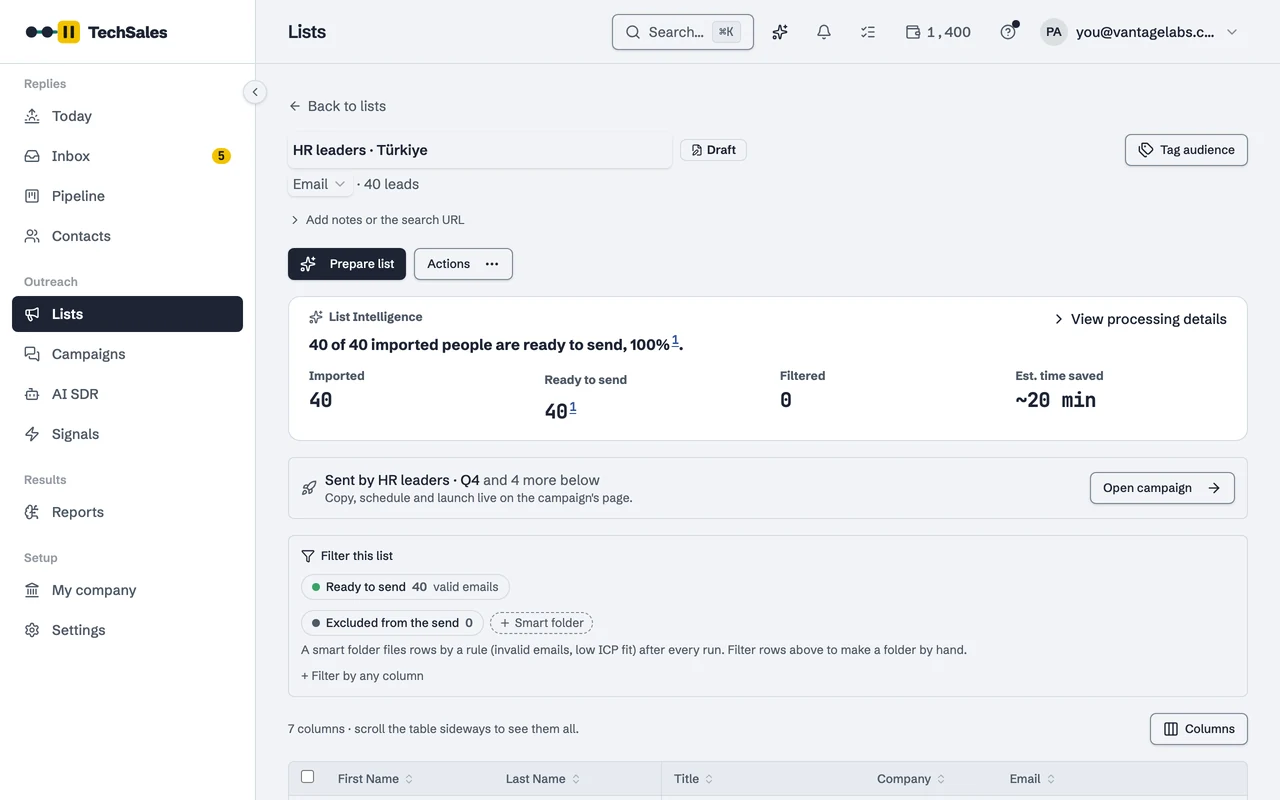
Step 1 / 5
Upload or find a list, and it gets cleaned for you.
Names are fixed, emails are checked so they do not bounce, and people who do not fit are left out with the reason.
Real product screens on a sample workspace with invented people.
Now see it with your own list.
Request a demo and we will run it on a list you already have: watch it get cleaned and split into email and LinkedIn.
Bad data never reaches your domains.
A list arrives from Apollo, Clay or a CSV. Before anything is sent, every row is checked against the things that actually burn a sending domain, as well as anyone you've already spoken to.
What leaves the refinery is a list you'd be happy to put your own name on.
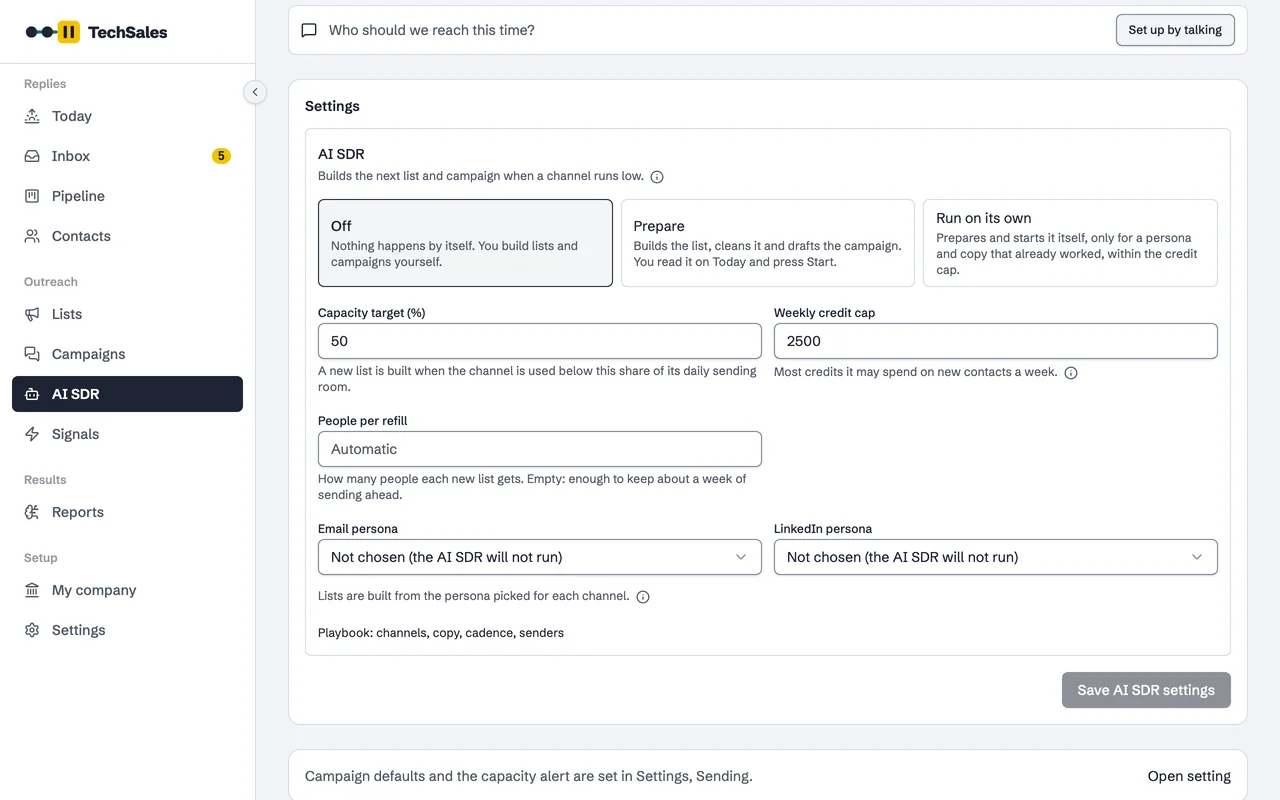
An AI sales assistant (AI SDR), when you want it.
Switch it on and it notices when you are running low on people to contact, looks first at companies that just had news, builds and checks the next list, picks your best message and sets the campaign up on your own tools. In Prepare you press Start; in Run on its own it sends what has already worked, within the budget you set. Both modes are in every plan.
- Your playbook: channels, copy, cadence, senders, language, signals, A/B
- A weekly credit cap, a safety brake and platform health checks
- A Monday email with what it built, cost and brought back
You pay for work done, not for seats held.
Every provider we orchestrate used to mean its own subscription, its own minimum and its own renewal. One balance replaces all of it.
1. Reserve
Before a run starts, the cost is calculated and held. You see the number before you commit, and a balance that can't cover it stops the run rather than half-finishing it.
2. Work
The providers do their job on your data. Rows that come back empty, profiles that turn out private, addresses the verifier never returns: none of it is silently charged.
3. Refund
Whatever the run didn't consume goes straight back to the balance, tied to the same job in your ledger. A failed run costs nothing at all.
Bring your own key
Already paying Apollo, Reoon or Apify directly? Connect your key and those operations cost zero credits. We run them on your account and meter nothing. The credit balance exists for the providers you'd rather not hold a contract with.
 Your key · 0 credits
 Your key · 0 credits
 ReoonYour key · 0 credits
 Your key · 0 credits
 Your key · 0 credits
 Your key · 0 credits
 Your key · 0 credits
 Your key · 0 credits
 Your key · 0 credits
 Your key · 0 credits
 Your key · 0 credits
 tregYour key · 0 credits
Not just numbers. Why you got them.
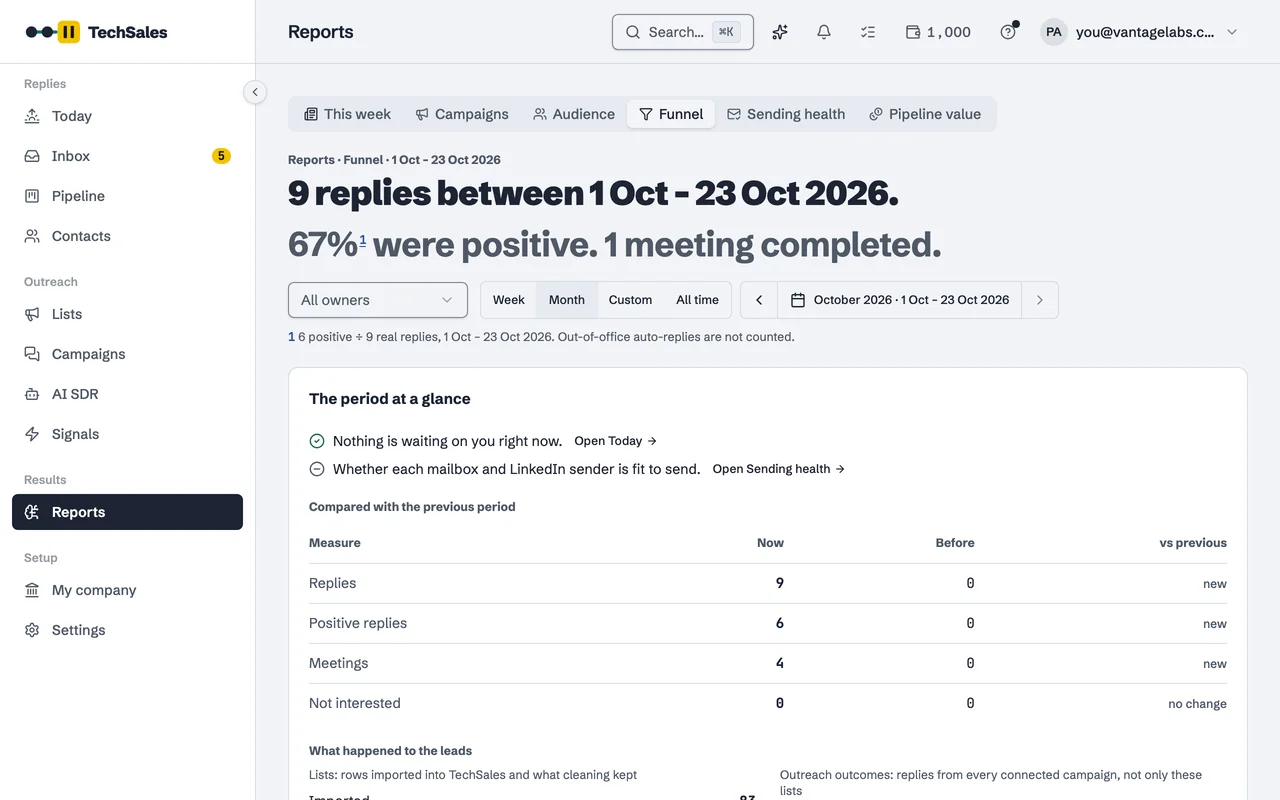
Every reply, list and campaign is read for you: what works, who says yes, why people say no, and what to change next, with how sure we are.
- Weekly briefWritten every Monday: what happened, what works, why people said no, each with the count behind it and one thing to do.
- What worksCompares the kinds of people you wrote to (by role, seniority, whether they are active on LinkedIn, whether the message opened with something personal) and only flags differences that are not luck. A/B tests built in.
- Why people say noEvery no is sorted by its reason: bad timing, wrong person, budget, a competitor. Each reason comes with what to change in your messages.
- Where people drop offFrom reply to meeting to deal: where people move on and where they stop, by channel and campaign.
- Who to write to nowFunding, hiring, a new job or recent LinkedIn activity: each lead gets a score for how warm they are right now.
- Ask in plain wordsAsk a question like you would ask a colleague; the answer comes from your own leads, campaigns and invoices.
- For agenciesHow every client is doing at a glance, and what worked for one client that you can try with another.
Everything else the workspace does.
Build the list
Persona to list, in one stepNew
Describe who you sell to. The agent turns it into search filters, shows the count and the credit cost, and builds the list only when you say go.
List Intelligence
Names and titles cleaned, two-pass email verification with a catch-all check, an ICP score and reason on every lead.
Company IntelligenceNew
AI builds your profile from your site and documents: products, personas, case studies and facts, each waiting for your approval.
Write and launch
One persona per campaign
AI sorts a list by persona and by gender, so every campaign speaks to one kind of buyer and greets them correctly.
Country playbooks
Length, call to action, opt-out line, banned phrases and forms of address follow the country you are writing to.
Cross-channel sequences
Email and LinkedIn on one timeline with one approval. A reply on either channel stops the other.
Reply and book
Reply Engine
Every reply classified and answered in your voice. Choose Manual, Copilot or Autopilot per workspace.
Meetings that hold
Calendar sync from Gmail or Microsoft 365, reminders before the call, and the outcome captured right after it.
Signals and temperature
Job changes, LinkedIn activity and post engagement turn into a warmth score on every lead.
Run and report
Your pipeline in Claude or ChatGPTNew
Connect claude.ai, ChatGPT or another MCP assistant and ask about your leads, campaigns, sending capacity and credits. It reads; it never sends or changes anything.
CRM-aware suppressionNew
Customers, chosen HubSpot deal stages and open deals never get a cold email. Do-not-contact syncs to every sending tool.
Reporting you can trust
Each tool's own numbers, interest dated by the reply, weekly client reports, and a What works view of which persona and copy book meetings.
- One inbox across every client
- Client portal with list approvals
- Installable app with push alerts
- Cost shown in credits before every run
Every tool it touches, through your own accounts.
Grouped by where each tool sits in the lifecycle, not by logo wall.
Data & Sourcing
Your accounts, your credits, your contracts. We read from them, we never resell them.
- Contact sourcingBYOK
 Account researchBYOK
- List importBYOK
- Customer & list importBYOK
 Google SheetsSheet & CSV import
- tregManaged data access
Data Refinery & Email Shield
Nothing reaches a sending domain until it has survived two independent checks.
- ReoonPrimary verification
- Catch-all waterfall
- LinkedIn search, activity & engagers
 Email finding
Intelligence & AI
Signals from the web, company research, and every reply read, scored and answered by Claude.
- Signals & company research
 Replies, scoring & Ask AI
 ClaudeAsk Claude about your pipelineBYOK
 ChatGPTAsk ChatGPT about your pipelineBYOK
Execution & CRM
One sequence across two channels, landing in the CRM and the calendar you already use.
- Email sendingBYOK
- Email sendingBYOK
- LinkedIn automationBYOK
- LinkedIn automationBYOK
 GmailSend & calendarBYOK
 Microsoft 365Send & calendarBYOK
- CRM sync & suppressionBYOK
 Auto-bookingBYOK
 Reply & meeting alerts
 Plans & credit top-ups
Yourself, with the AI SDR preparing, or with it running on its own.
Run it yourself
Clean and verify lists, write campaigns with the Campaign Builder, and reach people on email and LinkedIn in one sequence: when they reply on one, the other stops. Nothing starts unless you start it.
Your team does the work
See the featuresLet the AI SDR prepare
When a channel runs low on people, the AI SDR builds and cleans the next list from your persona and drafts the campaign. You read it on Today and press Start.
The AI SDR does the legwork, you start it
How the AI SDR worksLet it run on its own
It starts the next campaign itself, only with a persona and copy that already worked, inside your weekly credit cap, and pauses on high bounces or mostly negative replies.
Within the rules you set
How it stays in your controlSee it running on your own data.
Fourteen days, your keys, your list. Nothing sends without you approving it.